2. Key Compliance Information
To ensure the safe and responsible development and deployment of AI across all workflow patterns and deployment modes, this Standard mandates compliance with several key areas, aligning with industry best practices.
2.1 Compliance Process
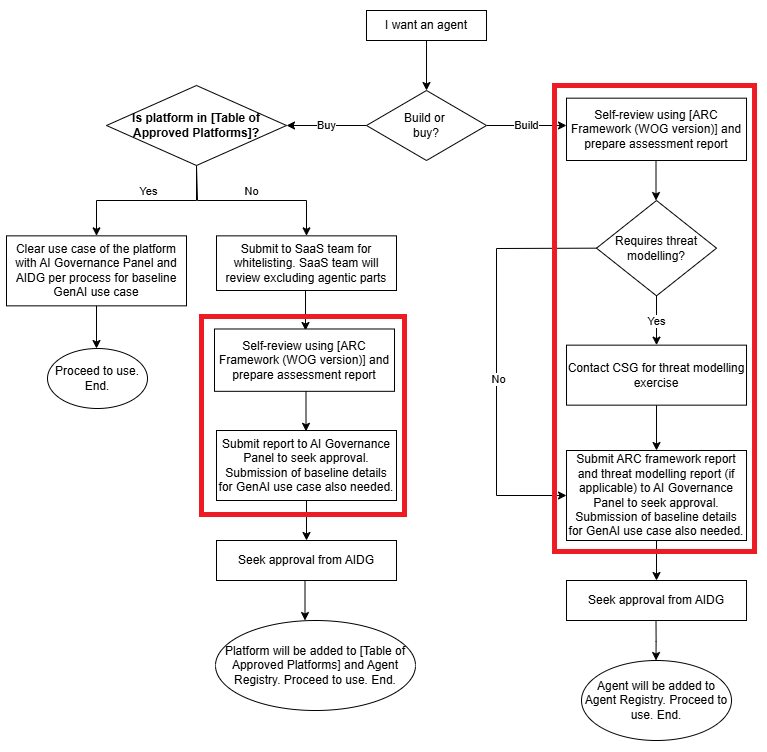
The flowchart below describes the steps to be followed to achieve compliance under this Standard. The process does not replace the requirements required for more general Generative AI use cases. Rather, for agentic use cases, this Standard mandates additional steps outlined in red boxes below. Some of the steps make references to tables and frameworks indicated in [ ].
Background on AI Governance Panel: Within GovTech, approval for GenAI use cases has been delegated from IDSC to AI Governance Panel. The panel is chaired by DCE Sau Sheong, with TMO and AISO as joint secretariats. To contact the panel, please reach out to Tan Congyuan (tan_congyuan@tech.gov.sg).
Regarding the definition of use cases requiring threat modelling, this refers to use cases that meets any of the following:
-
Any of the criteria (on top of being an agentic use case) for high-risk use cases or use cases requiring central oversight as specified in MDDI's Circular “Development and Deployment of Generative Artificial Intelligence in the Public Sector” (intranet link). Please refer to paragraphs 30 and 31 of the Circular for the latest list of criteria.
-
Contains agent(s) with capabilities to execute financial transactions or send official communications
2.2 Table of Approved Platforms
Agents built on a high-level, often low-code/no-code, environment (e.g. Google Agent Space) provides extensive, managed infrastructure, tooling, and governance out-of-the-box. The table of approved agent platforms reflect the platforms that have already been tested and deemed to be aligned with our recommendations.
This is still a work in progress and will be updated over time. For the latest list, please refer to the Agent Registry at this link.
Example:
| Platform | Provider | Rationale | Caveats |
|---|---|---|---|
| e.g. Gemini Enterprise | e.g. Google | e.g. GCP is supported in GCC2 up to C-CE | e.g. Must be used through GCC2. Commercial AgentSpace is not allowed. |
2.3 Approval Process for Platforms not yet in Pre-Approved Table
Examples in this category (PaaS and SaaS) would include: ChatGPT, Github Copilot, Google AgentSpace, AWS AgentCore, Snowflake Genie, etc.
If the platform is currently not yet listed in section 2.2, the following steps should be taken:
- Submit request to SaaS team for whitelisting of platform. (Contact approach for SaaS team TBC). The SaaS team will review the requested platform excluding agentic components.
- Conduct a self-review of the agentic components using the ARC Framework (WOG version). A step-by-step guide and template can be found below (section 2.5). The project team should prepare its own assessment report based on the guide given.
- Submit assessment report to AI Governance Panel for approval via FormSG. Note that project teams are also required to submit a separate baseline submission to AI Governance Panel to seek approval for this Generative AI use case.
- Upon receiving approval from AI Governance Panel, the project team may proceed to seek approval from AIDG.
- Usage of the platform has been approved. AI Governance Panel will add the platform to section 2.2. Project teams to add the agent to the Agent Registry via this link.
2.4 Approval Process for Agents Built outside of PaaS/SaaS
The following steps should be taken:
- Conduct a self-review of the agentic components using the ARC Framework (WOG version). A step-by-step guide and template can be found below (section 2.5). The project team should prepare its own assessment report based on the guide given.
- If the use case requires threat modelling (as defined in section 2.1), the project team submit request to CSG to undergo a threat modelling exercise (contact: kelvin_wong@tech.gov.sg). In contacting CSG, project teams should indicate if they have considered CSAS bulk tender services.
- Submit reports from steps 1 and 2 to AI Governance Panel for approval via FormSG. Note that project teams are also required to submit a separate baseline submission to AI Governance Panel to seek approval for this Generative AI use case.
- Upon receiving approval from AI Governance Panel, the project team may proceed to seek approval from AIDG.
- The agent has been approved. Project teams to add the agent to the Agent Registry via this link.
2.5 ARC Framework (WOG Version)
The Agentic Risk & Capability Framework (ARC) is a technical governance framework developed by GovTech's AI Practice for identifying, assessing, and mitigating safety and security risks in agentic AI systems. ARC provides a structured risk mapping distinguishing component, design, and capability-specific risks, and technical control specifications with risk-to-control mappings.
We have contextualised the general ARC Framework into a WOG-specific version which takes into account (i) current IT standards and controls, such as IM8 and the GenAI Circular, (ii) GovTech's current products and tools, and (iii) the unique operational considerations that we have in GovTech.
Project teams will submit the assessment report (similar to example at this link) to AI Governance Panel at the appropriate juncture (as per sections 2.3 and 2.4).
Tip: Project teams can fill up either this Word Document or Markdown file template. Teams are welcome to use AI to draft the first cut. To facilitate the use of AI, the Risk Register and controls are also available in Excel format and in Markdown format - risks and controls.
What if I'm using a SaaS or PaaS agentic tool?
You should continue to apply the ARC Framework to analyse the capabilities of your SaaS or PaaS agentic system, as the system will still have capabilities that may give rise to significant safety and security risks. However, as there may be limited customisability for such tools, you may not be able to implement all the required controls. In these cases, you should indicate that because you are using a SaaS/PaaS tool, you are unable to verify or implement the required controls. This will then be taken as part of the residual risk to be considered by the AI Strategy Office and the system owner.
2.5.1 How to use the framework
You will need to apply the framework to help you analyse your agentic system's risks. The following steps are adapted from the ARC Implementation Guide for AI Developers.
Step 1: Identify Capabilities
Document your system's capabilities using the ARC capability taxonomy. The framework defines three broad categories: Cognitive, Interaction, and Operational. You should also include an architecture diagram to help with the explanation.
WOG Capability Taxonomy
Cognitive Capabilities — The agent's internal "thinking" skills
| Capability | Description |
|---|---|
| Planning & Goal Management | Developing step-by-step executable plans, prioritizing activities based on importance and dependencies, monitoring progress, and adjusting when circumstances change |
| Agent Delegation | Assigning subtasks to other agents and coordinating their activities, including issuing instructions, managing inter-agent dependencies, and monitoring performance |
| Tool Use | Evaluating and selecting the best tool for specific subtasks, determining when tool invocation is necessary, and sequencing or combining multiple tools |
Interaction Capabilities — How the agent exchanges information with users, other agents, and external systems
| Capability | Description |
|---|---|
| Multimodal Understanding & Generation | Communicating across multiple modalities including natural language, image, audio, or video content |
| Official Communication | Autonomously composing and dispatching authoritative communications that formally represent an organisation to external parties (e.g. customers, regulators, media) via approved channels |
| Business Transactions | Autonomously initiating and executing binding business transactions such as payments, purchases, reservations, or service commitments within predefined authorisation limits |
| Internet & Search Access | Accessing, browsing, searching, and retrieving information from the Internet to augment knowledge with external and up-to-date sources |
| Computer Use | Directly operating a computer's graphical user interface through mouse, keyboard, and window-based interactions |
| Other Programmatic Interfaces | Interacting with external systems through APIs, SDKs, and backend services to exchange data or trigger actions |
Operational Capabilities — The agent's ability to execute actions within its operating environment
| Capability | Description |
|---|---|
| Code Execution | Writing, executing, and debugging code in various programming languages to automate tasks or solve computational problems |
| File & Data Management | Managing the full lifecycle of files and data — creating, reading, modifying, organising, and querying across unstructured artifacts and structured data stores |
| System Management | Directly managing and configuring technical systems and infrastructure, including monitoring health, managing credentials, provisioning resources, and applying optimisations |
Step 2: Evaluate Risks
For each identified capability, map specific risks using the components, design, and capabilities elements. Risks that are assessed to have an impact and likelihood rating of 2 or more will be considered as relevant (for Step 3).
Mapping risks
- Component and design risks — Apply to all agentic systems regardless of capabilities, unless you are certain that the component or design element is not applicable.
- Capability-specific risks — For each capability identified in Step 1
- Contextualise to your use case — Explain how this risk may materialise in your specific agentic system
- Apply relevance criteria — Score Impact and Likelihood separately (1-5 scale); retain risks where both scores meet your threshold
Five-Point Scoring Scale for Impact and Likelihood
We use a five-point scale to provide sufficient granularity for risk assessment while avoiding the analysis paralysis that comes with overly detailed scoring systems.
| Impact Scale | Likelihood Scale |
|---|---|
| 5 - Catastrophic: Financial loss >$1M; major irreversible physical or economic harm to people; severe regulatory violations; criminal liability 4 - Severe: Financial loss \(100K-\)1M; some reversible harm to people (e.g., temporary health impact, significant financial loss); major reputational damage; significant compliance issues 3 - Moderate: Financial loss \(10K-\)100K; minor reversible harm (e.g., temporary inconvenience, stress); customer dissatisfaction; moderate business impact 2 - Minor: Financial loss <$10K; no harm to people; internal inefficiency; limited user frustration 1 - Negligible: Minimal to no consequences; no harm to people |
5 - Very High: Almost certain to occur; happens regularly in similar systems; requires only basic access or common conditions (e.g., public internet connection, standard user input) 4 - High: Likely to occur; observed in comparable systems; requires commonly available capabilities or tools 3 - Moderate: May occur under certain circumstances; requires specific but achievable conditions or moderate attacker sophistication 2 - Low: Unlikely but possible; requires specific conditions, insider knowledge, or elevated attacker capabilities to materialize 1 - Very Low: Rare; requires highly unlikely combination of factors, multiple zero-day exploits, or extraordinary attacker resources |
Step 3: Implement Controls
For each relevant risk from Step 2, review recommended technical controls from the Risk Register. Contextualise controls to your specific implementation — not all controls are equally critical, and teams must exercise judgement in adapting controls to meaningfully address risks.
Understanding Control Levels
The ARC framework recommends controls at different levels of priority. Teams should apply differentiated treatment based on risk severity and organisational context:
| Control Level | Context | Expectation |
|---|---|---|
| Level 0: Essential | High-impact risks, regulatory requirements | Implement unless technically infeasible; document exceptions with compensating controls |
| Level 1: Recommended | Moderate-impact risks, best practices | Implement where practical; exercise engineering judgement on feasibility |
| Level 2: Enhanced | Defence-in-depth, low residual risk tolerance | Consider based on risk appetite and available resources |
Not all controls are mandatory — the framework provides a menu of options. Apply controls proportionate to risk severity.
Contextualising Controls: From Framework to System-Specific
Controls may need adaptation to your specific use case. Below are examples showing the progression from framework baseline → organisation context → system-specific adaptation:
Example: Human Approval Workflows
- Framework Baseline: "Require human approval before executing high-impact actions"
- Organisation Control: "Require manager approval via workflow for transactions >$1,000; auto-approve lower amounts with notification"
- System-Specific Adaptation: "For automated refund agent: Require approval for refunds >$500 (lower threshold due to fraud risk); include customer history in approval request; auto-approve ≤$500 only for customers with >6 months history"
Example: Hallucination Reduction
- Framework Baseline: "Implement methods to reduce hallucination rates in agent outputs"
- Organisation Control: "Use RAG with organisation-verified knowledge bases; add UI disclaimers on critical information"
- System-Specific Adaptation: "For HR policy assistant: Use RAG with HR policy database; restrict LLM to only answer from retrieved documents (block answers with <0.8 retrieval confidence); add disclaimer: 'Please verify critical details with your HR representative'"
Step 4: Assess Residual Risks
Assess residual risks after controls are implemented. Consider where harm can still occur and what control limitations exist. If residual risks remain unacceptable, implement additional controls to reduce likelihood or impact.
Thinking Through Residual Risks
- Attack vectors not covered — e.g., "Guardrails detect known patterns but novel jailbreaks may bypass them"
- Operational failures — e.g., "Human approval workflow fails if approver is unavailable or rubber-stamps requests"
- Edge cases — e.g., "Rate limiting prevents bulk abuse but doesn't stop slow, persistent attacks"
- Dependencies — e.g., "Control relies on external API that may have outages or be deprecated"
2.5.2 WOG Risk Register
The Risk Register and controls are also available in Excel format and in Markdown format - risks and controls.
How to use the Risk Register
Click any risk row to expand and view its full description, references, and recommended controls, then click individual control statements for detailed implementation guidance. Use the expand icons (▸/▾) to navigate between views.
2.5.3 Resources & Further Reading
For deeper technical details on the ARC Framework:
| Resource | Description | Link |
|---|---|---|
| ARC Framework Portal | Full framework documentation including capability taxonomy, risk definitions, and control specifications | govtech-responsibleai.github.io/agentic-risk-capability-framework |
| Framework Introduction | Design rationale, literature review, and theoretical foundation | ARC Introduction |
| Agentic System Elements | Unified reference for components, design, and capabilities | ARC Elements |
| Interactive Risk Register | Filterable, searchable register with 46 risks and 88 controls | ARC Risk Register |
| ARC Implementation Guide | Step-by-step guidance for organisation-level adoption and per-system assessment | ARC Implementation |
| ARCvisor Tool | AI-powered risk assessment assistant (50%+ time savings) | ARCvisor |
| CSA Securing AI Systems | Guidelines and companion guide on securing AI systems | CSA Guidelines |
| CSA Agentic AI Addendum | Draft addendum on securing agentic AI (references ARC) | CSA Agentic AI |