Chapter 5E: Experiment Tracking
MLFlow is an open-source platform designed to streamline the machine learning lifecycle by providing features for experiment tracking, project packaging, model management, and model deployment. It offers a standardized interface to record, compare, and store metrics, parameters, and artifacts across different frameworks and toolchains.
5E.1. What Is MLFlow and What Does It Offer?
-
Experiment Tracking
Log hyperparameters, metrics, and artifacts for each experiment run. You can visualize experiment results in a user-friendly UI, compare runs, and revisit historical performance. -
ML Projects
Package ML code into a reusable and reproducible format, specifying dependencies and entry points for training and evaluation. -
Model Registry
Register and version models, track lineage, and transition models through stages (e.g., staging, production). -
Model Serving
Deploy models for real-time inference or batch processing, with options for Dockerized containers or other serving frameworks.
MLFlow supports a wide range of ML libraries like scikit-learn, PyTorch, TensorFlow, and XGBoost, making it suitable for diverse projects.
5E.2. Different Integration Approaches for MLFlow
You have two primary ways to integrate MLFlow into an AWS SageMaker pipeline:
Approach 1: Managed MLFlow Within SageMaker
How It Works
AWS SageMaker Studio now offers a managed MLFlow integration. You can enable MLFlow tracking within SageMaker Studio, letting you log metrics and parameters directly to a managed backend.
Pros
- Easy Setup: Minimal overhead configuring MLFlow servers or storage.
- Seamless Permissions: Leverages existing AWS IAM roles and SageMaker features.
- Scalability & Reliability: AWS handles the management of MLFlow backend.
Cons
- Less control over underlying infrastructure.
- Limited customization if you need advanced MLFlow configurations.
Approach 2: Manual Integration with a Self-Managed MLFlow Server
How It Works
Start by hosting a MLFlow tracking server on your own instance (e.g., EC2 or on-prem server), and configure a backend store (e.g., MySQL or PostgreSQL) and a storage location for model artifacts (e.g., S3).
Pros
- Full Control: Choose how to scale, where to store data, and how to secure endpoints.
- Customizable: Fine-tune MLFlow configurations and versioning policies.
Cons
- Increased Maintenance: You must manage server setup, scaling, security patches, etc.
- IAM Complexity: Additional overhead ensuring secure communication between SageMaker and your MLFlow tracking server.
Recommended Approach: We suggest adopting the managed MLFlow solution within SageMaker, as it significantly reduces maintenance and operational overhead, allowing you to focus on data science and model optimization rather than infrastructure management.
5E.3. Setting Up MLFlow Managed Service on AWS SageMaker AI Studio
-
Start by navigating to Amazon SageMaker AI from the AWS Console and click on Studio under the Applications and IDEs tab. Next, select your user profile and click on Open Studio, then Launch Personal Studio to launch the SageMaker Studio interface.

-
On the SageMaker Studio home page, click on the MLFlow icon under the Applications tab to open the MLFlow managed interface.

-
Click on the Create button on the MLFlow interface and provide a name for the MLFlow tracking server and the S3 URI to store the model artifacts. Please ensure that you have configured the appropriate IAM role to support communication between AWS SageMaker and the MLFlow tracking server.

-
The MLFlow tracking server will take several minutes to be created and can be found on the MLFlow managed interface.

- The MLFlow server ARN can be found by clicking on the MLFlow tracking server, under the tracking server ARN field.
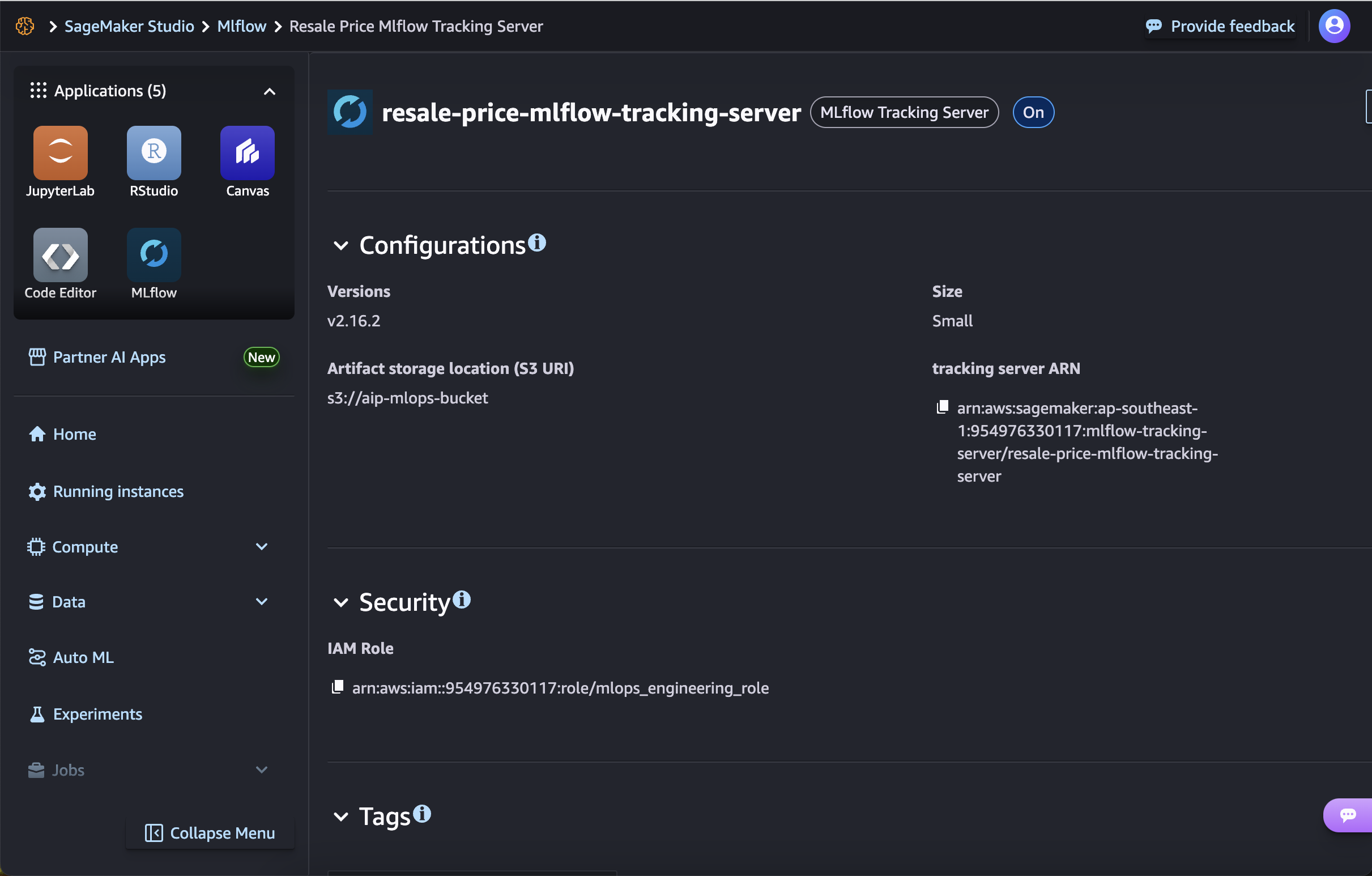
- The MLFlow tracking server interface can be accessed by clicking on the dot icon beside the MLFlow tracking server, and clicking on Open MLflow.

5E.4. Incorporating MLFlow Logging Step in an AWS SageMaker Pipeline
Below is an example showing how you might integrate MLFlow tracking within an AWS SageMaker pipeline step.
Start by adding a ProcessingStep in pipeline.py:
# pipeline.py
mlflow_processor = SKLearnProcessor(
    framework_version="1.2-1",
    instance_type=processing_instance_type,
    instance_count=processing_instance_count,
    base_job_name=f"{base_job_prefix}/mlflow-logging",
    sagemaker_session=pipeline_session,
    role=role,
)

evaluation_s3_output_path = step_eval.arguments["ProcessingOutputConfig"][
    "Outputs"
][0]["S3Output"]["S3Uri"]
mlflow_args = mlflow_processor.run(
    code=os.path.join(BASE_DIR, "mlflow_logging.py"),
    arguments=[
        "--region",
        region,
        "--pipeline-name",
        PIPELINE_NAME,
        "--mlflow-arn",
        MLFLOW_ARN,
        "--tuning-step-name",
        TUNING_STEP_NAME,
        "--evaluation-metrics-s3-path",
        evaluation_s3_output_path,
    ],
)

step_mlflow = ProcessingStep(
    name="MLflowLogging",
    step_args=mlflow_args,
    cache_config=cache_config,
    depends_on=[step_tuning, step_eval],
)
Explanation
- Instantiate a processing container: In
pipeline.py, anSKLearnProcessoris created (mlflow_processor) that will run the MLflow logging script inside a managed scikit‑learn container. - The S3 path to the evaluation report is extracted from the previous evaluation step (
step_eval). - The
mlflow_logging.pyscript is invoked with arguments for AWS region, pipeline name, MLflow server ARN, tuning step name, and the evaluation metrics S3 URI. - A
ProcessingStepnamed"MLflowLogging"is added to the pipeline (step_mlflow), configured to run after both the hyperparameter tuning (step_tuning) and evaluation (step_eval) steps.
Following which, define a separate Python file containing the MLFlow tracking code:
# mlflow_logging.py
import sys
import subprocess
import json
import logging
import os
import argparse


def install(package, version=None):
    if version:
        subprocess.check_call(
            [sys.executable, "-m", "pip", "install", f"{package}=={version}"]
        )
    else:
        subprocess.check_call([sys.executable, "-m", "pip", "install", package])


try:
    import mlflow
except ImportError:
    print("MLflow not found. Installing...")
    install("mlflow==2.16.2")
    install("sagemaker-mlflow==0.1.0")
    install("sagemaker")
    import mlflow

try:
    import sagemaker
except ImportError:
    print("sagemaker not found. Installing...")
    install("sagemaker")
    import sagemaker

import boto3


logger = logging.getLogger()
logger.setLevel(logging.INFO)
logger.addHandler(logging.StreamHandler())


def get_hpo_job_name_from_pipeline(
    region_name: str, tuning_step_name: str = "HyperparameterTuning"
) -> str:
    """Retrieves the name of the most recent completed SageMaker hyperparameter tuning job
    that matches the specified tuning step name.

    Args:
        region_name (str): The AWS region where the SageMaker client is initialized.
        tuning_step_name (str, optional): The prefix of the tuning step name to filter
            the hyperparameter tuning jobs. Defaults to "HyperparameterTuning".

    Returns:
        str: The name of the most recent completed hyperparameter tuning job
        that matches the specified criteria.

    Raises:
        RuntimeError: If no recent tuning job matching the criteria is found.
    """
    sagemaker_client = boto3.client("sagemaker", region_name=region_name)

    # Get the most recent completed tuning jobs that matches with the tuning step name
    tuning_jobs = sagemaker_client.list_hyper_parameter_tuning_jobs(
        SortBy="CreationTime",
        SortOrder="Descending",
        NameContains=tuning_step_name[:8],
        MaxResults=1,
        StatusEquals="Completed",
    )

    # Filter to find a job related to our pipeline (based on name pattern)
    hyperparameter_tuning_job_name = None
    for job in tuning_jobs["HyperParameterTuningJobSummaries"]:
        job_name = job["HyperParameterTuningJobName"]
        hyperparameter_tuning_job_name = job_name

    if not hyperparameter_tuning_job_name:
        raise RuntimeError(
            f"Could not find a recent tuning job for pipeline {pipeline_name}"
        )
    logger.info(f"Found tuning job: {hyperparameter_tuning_job_name}")

    return hyperparameter_tuning_job_name


if __name__ == "__main__":
    ##############################
    # Parse Arguments
    ##############################
    logger.info("Logging input arguments.")
    parser = argparse.ArgumentParser()
    parser.add_argument("--region", type=str, required=True)
    parser.add_argument("--pipeline-name", type=str, required=True)
    parser.add_argument("--mlflow-arn", type=str, required=True)
    parser.add_argument("--tuning-step-name", type=str, required=True)
    parser.add_argument("--evaluation-metrics-s3-path", type=str, required=True)
    args = parser.parse_args()
    region = args.region
    pipeline_name = args.pipeline_name
    mflow_arn = args.mlflow_arn
    tuning_step_name = args.tuning_step_name
    evaluation_metrics_s3_path = args.evaluation_metrics_s3_path
    hyperparameter_tuning_job_name = get_hpo_job_name_from_pipeline(
        region_name=region, tuning_step_name=tuning_step_name
    )

    ##############################
    # Setup MLFlow
    ##############################
    logger.info("Setting MLFlow tracking URI and experiment.")
    arn = mflow_arn
    mlflow.set_tracking_uri(arn)

    logger.info("Setting MLFlow experiment.")
    experiment_name = pipeline_name
    mlflow.set_experiment(experiment_name)

    # Start an MLflow run
    with mlflow.start_run():
        ##############################
        # Fetch Hyperparameters
        ##############################
        logger.info("Fetching model hyperparameters.")
        try:
            sagemaker_client = boto3.client("sagemaker", region_name=region)
            tuning_job_description = (
                sagemaker_client.describe_hyper_parameter_tuning_job(
                    HyperParameterTuningJobName=hyperparameter_tuning_job_name
                )
            )
            best_training_job_name = tuning_job_description["BestTrainingJob"][
                "TrainingJobName"
            ]

            # Get the training job description
            training_job_description = sagemaker_client.describe_training_job(
                TrainingJobName=best_training_job_name
            )
            best_model_hyperparameters = training_job_description["HyperParameters"]

            logger.info(f"Hyperparameters: {best_model_hyperparameters}")
            mlflow.log_params(best_model_hyperparameters)

        except Exception as e:
            logger.error(f"Failed to log hyperparameters: {e}")

        ##############################
        # Fetch Evaluation Metrics
        ##############################
        logger.info("Fetching model evaluation metrics.")

        # Download evaluation metric report locally
        evaluation_metric_local_path = "/opt/ml/output/metrics/evaluation.json"
        os.system(
            f"aws s3 cp {evaluation_metrics_s3_path + '/evaluation.json'} {evaluation_metric_local_path}"
        )

        if os.path.exists(evaluation_metric_local_path):
            try:
                with open(evaluation_metric_local_path, "r") as f:
                    metrics = json.load(f)
                logger.info(f"Evaluation Metrics: {metrics}")
                mlflow.log_metric(
                    "Mean Square Error", metrics["regression_metrics"]["mse"]["value"]
                )
                mlflow.log_metric(
                    "Root Mean Square Error",
                    metrics["regression_metrics"]["rmse"]["value"],
                )
                mlflow.log_metric(
                    "Mean Absolute Error", metrics["regression_metrics"]["mae"]["value"]
                )
                mlflow.log_metric(
                    "Mean Absolute Percentage Error",
                    metrics["regression_metrics"]["mape"]["value"],
                )
                mlflow.log_metric(
                    "R2 Score", metrics["regression_metrics"]["r2"]["value"]
                )
            except Exception as e:
                logger.error(f"Failed to log evaluation metrics: {e}")
        else:
            logger.warning(
                f"Evaluation metrics file not found at {evaluation_metric_local_path}"
            )

        ##############################
        # Log Artifacts
        ##############################
        logger.info("Logging artifacts.")
        job_config_artifacts_path = "/opt/ml/config/processingjobconfig.json"
        resource_config_artifacts_path = "/opt/ml/config/resourceconfig.json"

        if os.path.exists(job_config_artifacts_path):
            try:
                mlflow.log_artifact(
                    job_config_artifacts_path, artifact_path="job_config"
                )
            except Exception as e:
                logger.error(f"Failed to log job config artifacts: {e}")
        else:
            logger.warning(
                f"Job config artifacts directory not found at {job_config_artifacts_path}"
            )

        if os.path.exists(resource_config_artifacts_path):
            try:
                mlflow.log_artifact(
                    resource_config_artifacts_path, artifact_path="resource_config"
                )
            except Exception as e:
                logger.error(f"Failed to log resource config artifacts: {e}")
        else:
            logger.warning(
                f"Resource config artifacts directory not found at {resource_config_artifacts_path}"
            )
Explanation
- Dynamic dependency installation: Attempts to import
mlflowandsagemaker-mlflow, installing them (andsagemaker) viapipif missing, ensuring the container has all required libraries. - Argument parsing: Reads command‑line flags for AWS region, pipeline name, MLflow ARN, tuning step name, and the S3 path to the evaluation metrics file.
- Discover best HPO job: Uses
boto3to list completed hyperparameter tuning jobs filtered by the tuning step prefix, retrieves the most recent job name. - Configure MLflow: - Sets the MLflow tracking URI to the provided MLflow ARN and names the experiment after the pipeline.
- Within a
mlflow.start_run()context, fetches and logs:- Best hyperparameters from the SageMaker tuning job’s training job description.
- Evaluation metrics (MSE, RMSE, MAE, MAPE, R²) by downloading and parsing the
evaluation.jsonfrom S3. - Job and resource configuration artifacts if present in the processing container.
- Wraps AWS calls and file operations in
try/exceptblocks, logging successes, failures, or missing files to help with debugging and auditability.
5E.5. Summary
MLFlow offers a versatile toolkit for experiment tracking, model registry, and model serving, streamlining your MLOps workflows. Within AWS SageMaker, you can integrate MLFlow in two primary ways:
- Managed MLFlow in SageMaker Studio, which provides a low-maintenance, AWS-curated environment for logging experiments.
- Self-Managed MLFlow, where you run your own MLFlow server on AWS (EC2, ECS, or EKS) with full control but higher operational overhead.
For most teams, especially those looking to streamline infrastructure management, the managed MLFlow option is recommended. By including a few additional lines of code in your train scripts and SageMaker pipeline, you can start logging metrics, parameters, and model artifacts seamlessly—empowering your team to build a more auditable, replicable, and scalable ML development process.