Chapter 8B: Frontend, Non-Native Models & LLMs
In this chapter, we delve into various considerations that may arise during the productionization of your MLOps initiatives. Specifically, we focus on the frontend development, accommodating different types of machine learning models, and the unique aspects of working with Large Language Models.
8B.1. Serving prediction through collaboration with frontend developers
Frontend development is responsible for creating the user interface through which users interact with the machine learning model. This can be critical because how the prediction are served can be critical to the value it can bring. This will also determine the requirements of ML model, on the type of data that needs to be fed into the frontend. This is to ensure that the interface not only meets the functional requirements but also enhances the overall value of the machine learning models it supports.
Key considerations include:
- Frontend & Backend Integration: Facilitate smooth integration between front-end applications and backend MLOps pipelines.
- Feedback Loops: Establish processes to gather and analyze feedback loops.
- User-Centric Design: Collaborate with front-end designers to determine the most effective ways to present predictions or inferences to users, ensuring clarity and usability.
8B.2. Using CStack & Streamlit for Frontend Development
Streamlit is an open-source Python library designed for creating interactive web applications for data science and machine learning projects with minimal effort. It allows data scientists to rapidly prototyping data-driven applications, sharing insights, and collaborating with others.
Quoting directly from CStack Developer Portal, Container Stack (CStack) integrates with SHIP-HATS and StackOps to deliver a comprehensive agile development environment. Its objective is to streamline compliance with IM8 and enable teams to modernise applications efficiently, without the complexities of infrastructure setup.
Here are the basic steps you may want to take to deploy your frontend application: 1. Ensure you have a endpoint API that is working. If you have not done so, please refer to Chapter 3 to 5 on how to set up a endpoint using SageMaker. 2. Create your frontend app, say using python, which should pull your outputs from a prediction serving endpoint. 3. Containerize your frontend application 4. Define Networking & Security, as required 5. Deploy your container
The exact steps for deploying your frontend app using MAESTRO SageMaker and CStack can be found in our innersource page at sgts.gitlab-dedicated/innersource/ai-ml/. Feel free to reach out to the AI Practice if you have challenges deploying your first application.
8B.3. Different Model Types for AWS SageMaker
Here are some key questions to consider :
-
Is the model architecture natively supported by the hosting platform?
For instance, SageMaker offers a suite of built-in algorithms and pre-trained models that can be integrated directly into an MLOps workflow, saving time and effort. -
Are fixed library versions required?
If so, check if the hosting platform provides prebuilt images that include those libraries, or if you can install the necessary libraries on top of the provided images. If neither option is suitable, you might need to adapt a custom container for your specific needs. -
Is model training part of the CI/CD pipeline, or will you use fixed model weights?
If training is required in the pipeline, this will affect your setup. Alternatively, if fixed model weights are sufficient, they can be uploaded directly into an S3 bucket (or whichever data storage solutino of choice) for easy access.
Answering these questions will guide you through the following flowchart and help you understand the various artifacts needed to achieve Stage 2 of MLOps.
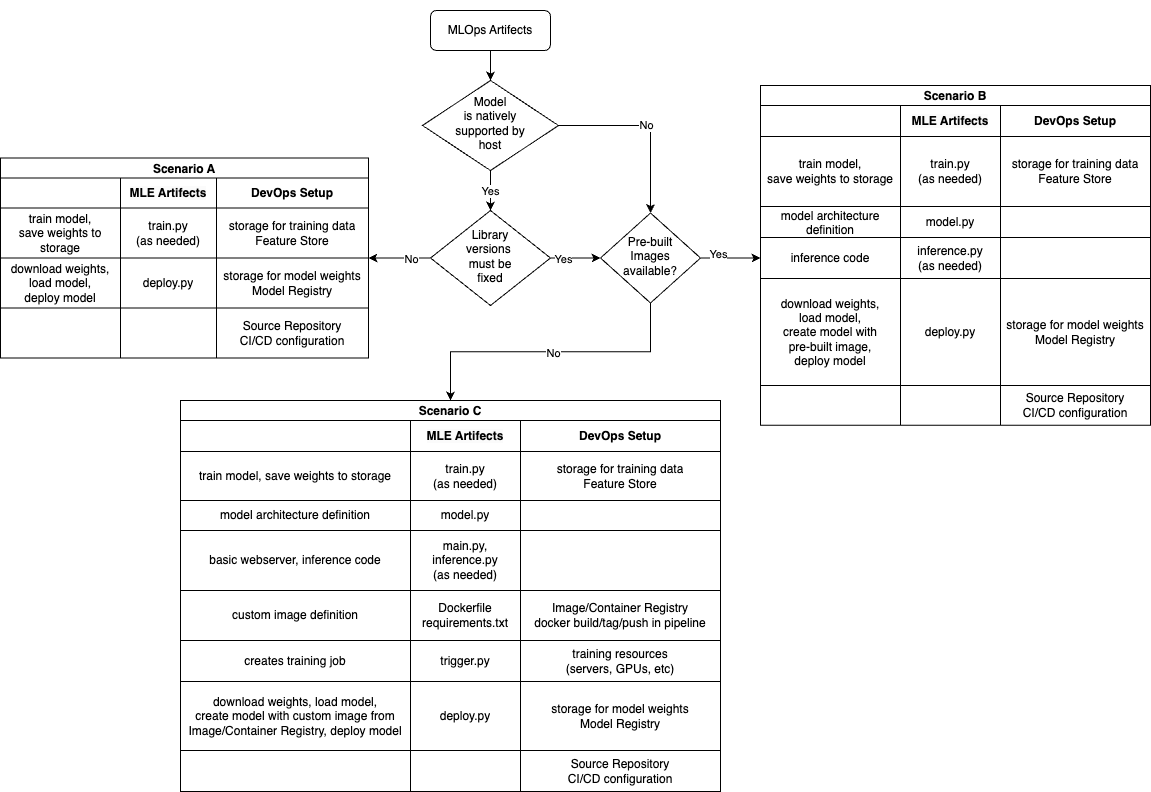
Based on your answers to the three questions above, we can categorize most DevOps setup requirements into three scenarios — A, B, and C. Each scenario can be further divided based on whether model training is required as part of the MLOps pipeline, or if the model weights will be generated outside of the pipeline. This is represented by the line train.py (as needed) in the scenario boxes.
For Scenarios A and B, we recommend using AWS SageaMaker natively supported models, which provides MLOps pipeline templates suited to various needs.
For Scenario C, options include: - Local Notebook Development + SHIP-HATS GitLab (using WOG runners) + AWS SageMaker - Local Notebook Development + SHIP-HATS GitLab + AWS CodeBuild + AWS SageMaker - In general, you will need a few key components: - development notebook/environment - source code repository (containing both model code and dockerfiles) - CI/CD configuration + runners - model registry (usually comes with container registry) - model hosting platform
Below are possible reference that could be useful depending on your scenarios
Scenario A: Model is natively supported + no need for fixed library versions - Training a model on SageMaker using Python SDK. - Deploying a model on SageMaker.
Scenario B: Model is natively supported + need library versions to be fixed - Training a scikit-learn model on SageMaker - Directory structure needed to deploy a model with requirements.txt on SageMaker
Scenario C: Model is not natively supported or custom Docker image required - Adapting your inference container for SageMaker
Triggering Lambdas using EventBridge: - EventBridge - change in SageMaker training job status - EventBridge - S3 bucket object creation
8B.4 LLMOps
We’re still in the process of developing our approach to LLMOps and expect to add new chapters on this topic. In the meantime, if you're already exploring how to extend your deployment practices to include LLMs and would like support, feel free to reach out to the AI Practice.
If you prefer to explore this on your own, here are a few things you may want to consider:
Endpoints to create:
-
Fixed Prompt: Useful for deterministic outputs where inputs and prompts are predefined (e.g., classification, summarization).
-
Retrieval-Augmented Generation (RAG): Combines LLMs with external knowledge sources to provide more accurate and context-aware responses. This setup typically involves a retrieval step followed by a generative step.
Data Infrastructure & Pipeline:
-
Data Pipeline & Data Stores: Stores chat history, session context, user inputs, model outputs, and other metadata.
-
Vector Databases: Used to store and retrieve semantic representations of documents for similarity search, essential for RAG and context-aware applications.
-
Prompt Templates: Reusable, parameterized prompts that help standardize and scale prompt engineering across use cases.
8B.5. Conclusion
This marks the end of this MLOps playbook, but it’s also just the beginning. There’s so much more to cover, and we have exciting plans ahead. Keep an eye out for future chapters.
If you have any questions, feel free to reach out—we’re always happy to make time to chat. And if you’re interested in collaborating, let’s talk!